
Pupil Labs - Core
High Level Pupil Core Introduction
Pupil Core is a wearable eye tracker. The system consists of two inward-facing eye cameras and one forward-facing world camera mounted on a wearable eyeglasses-like frame.
Pupil Core provides gaze data in its world camera’s field of view, regardless of the wearer’s head position. As such, gaze can be analysed with the wearer looking and moving freely in their environment.
Pupil Core differs from remote eye trackers often used with |PsychoPy|. Remote eye trackers employ cameras mounted on or near a computer monitor. They provide gaze in screen-based coordinates, and this facilitates closed-loop analyses of gaze based on the known position of stimuli on-screen and eye gaze direction.
In order to use Pupil Core for screen-based work in |PsychoPy|, the screen will need to be robustly located within the world camera’s field of view, and Pupil Core’s gaze data subsequently transformed from world camera-based coordinates to screen-based coordinates. This is achieved with the use of AprilTag Markers.
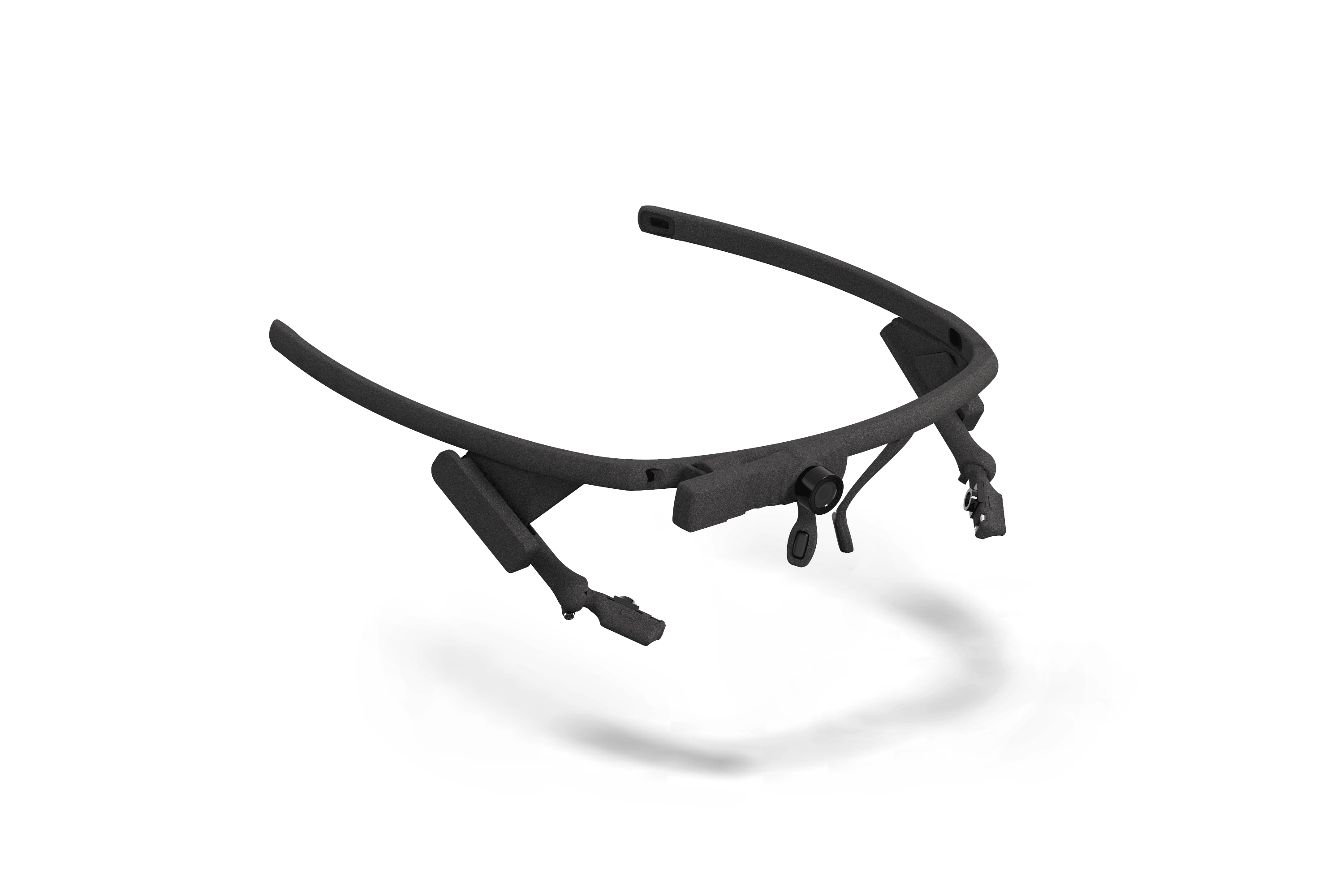
For a detailed overview of wearable vs remote eye trackers, check out this Pupil Labs blog post.
Join the Pupil Labs Discord community to share your research and/or questions.
Device, Software, and Connection Setup
Additional Software Requirements
Pupil Capture version v2.0 or newer
Platforms:
Windows 10
macOS 10.14 or newer
Ubuntu 16.04 or newer
Supported Models:
Pupil Core headset
Setting Up the Eye Tracker
Follow Pupil Core’s Getting Started guide to setup the headset and Capture software
Setting Up |PsychoPy|
Open
experiment settingsin the Builder Window (cog icon in top panel)Open the
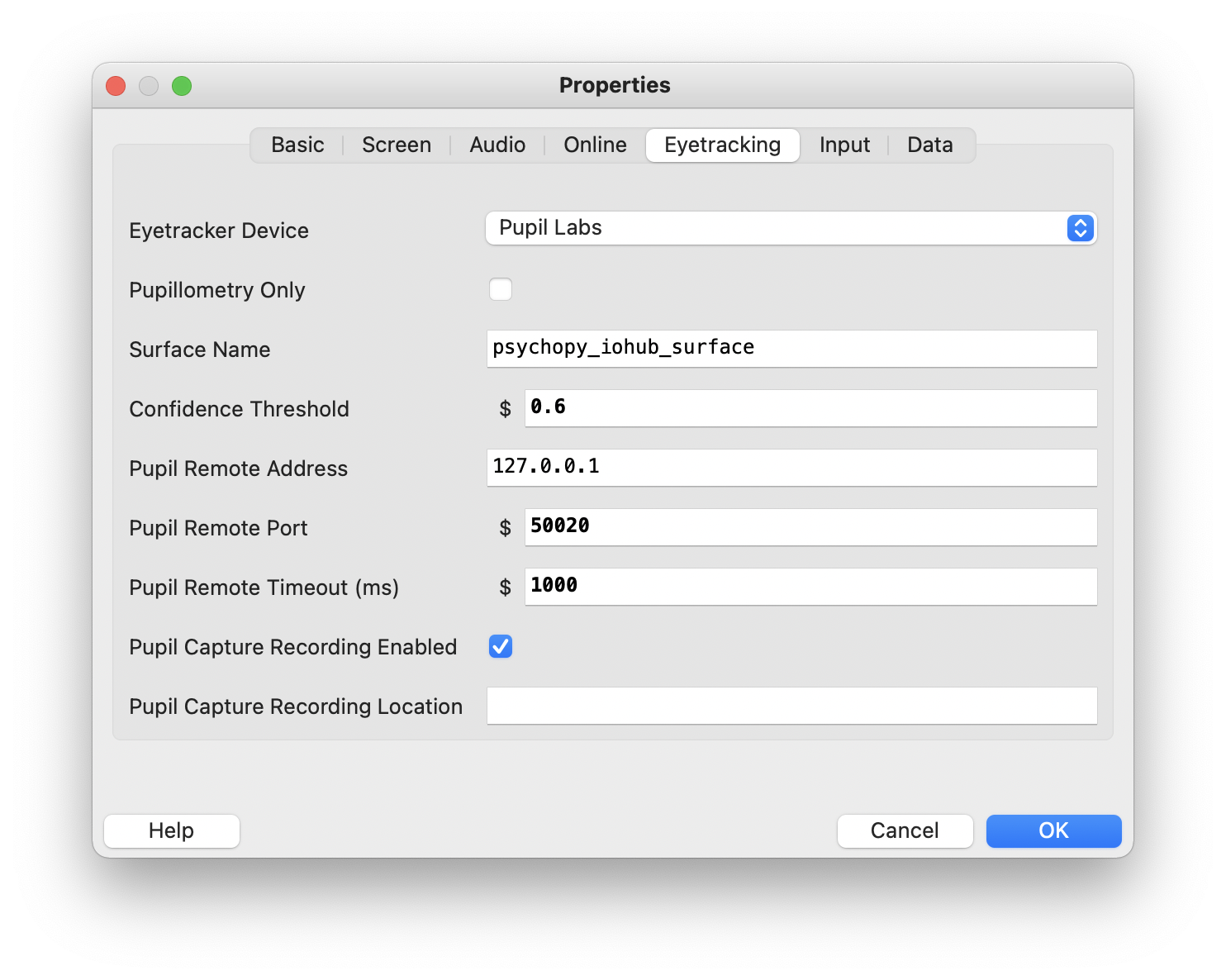
EyetrackingtabModify the properties as follows:
Select
Pupil Labsfrom theEyetracker Devicedrop down menuPupil Remote Address/Port- Defines how to connect to Pupil Capture. See Pupil Capture’s Network API menu to check address and port are correct. |PsychoPy| will wait the amount of milliseconds declared inPupil Remote Timeout (ms)for the connection to be established. An error will be raised if the timeout is reached.Pupil Capture Recording- Enable this option to tell Pupil Capture to record the eye tracker’s raw data during the experiment. You can read more about that in Pupil Capture’s official documentation. LeavePupil Capture Recording Locationempty to record to the defaultGaze Confidence Threshold- Set the minimum data quality received from Pupil Capture. Ranges from 0.0 (all data) to 1.0 (highest possible quality). We recommend using the default value of 0.6.Pupillometry Only- If this mode is selected you will only receive pupillometry data. No further setup is required. If you are interested in gaze data, keep this option disabled and read on below.
Pupillometry + Gaze Mode
To receive gaze, enable Pupil Capture’s Surface Tracking plugin:
Start by printing four apriltag markers and attaching them at the screen corners. Avoid occluding the screen and leave sufficient white space around the marker squares. Read more about the general marker setup here.

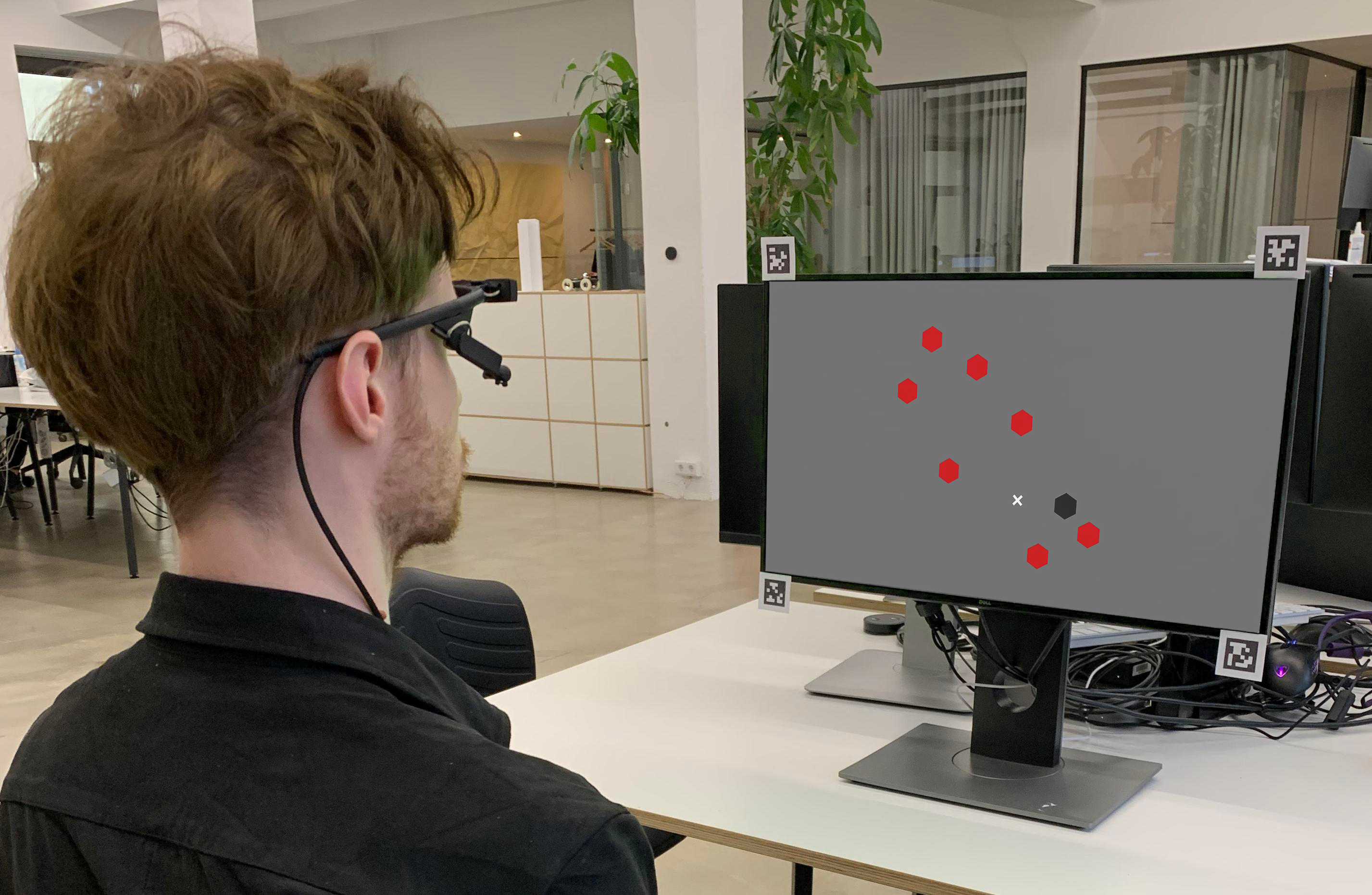
Define a surface and align its surface corners with the screen corners as good as possible
Rename the surface to the name set in the
Surface Namefield of the eye tracking project settings (default:psychopy_iohub_surface)Run the |PsychoPy| calibration component as part of your experiment
Implementation and API Overview
EyeTracker Class
- class psychopy.iohub.devices.eyetracker.hw.pupil_labs.pupil_core.EyeTracker(*args, **kwargs)[source]
Bases:
EyeTrackerDeviceImplementation of the
Common Eye Tracker Interfacefor the Pupil Core headset.Uses ioHub’s polling method to process data from Pupil Capture’s Network API.
To synchronize time between Pupil Capture and PsychoPy, the integration estimates the offset between their clocks and applies it to the incoming data. This step effectively transforms time between the two softwares while taking the transmission delay into account. For details, see this real-time time-sync tutorial.
This class operates in two modes, depending on the
pupillometry_onlyruntime setting:- Pupillometry-only mode
If the
pupillometry_onlysetting is toTrue, the integration will only receive eye-camera based metrics, e.g. pupil size, its location in eye camera coordinates, etc. The advatage of this mode is that it does not require calibrating the eye tracker or setting up AprilTag markers for the AoI tracking. To receive gaze data in PsychoPy screen coordinates, see the Pupillometry+Gaze mode below.Internally, this is implemented by subscribing to the
pupil.data topic.
- Pupillometry+Gaze mode
If the
Pupillometry onlysetting is set toFalse, the integration will receive positional data in addition to the pupillometry data mentioned above. For this to work, one has to setup Pupil Capture’s built-in AoI tracking system and perform a calibration for each subject.The integration takes care of translating the spatial coordinates to PsychoPy display coordinates.
Internally, this mode is implemented by subscribing to the
gaze.3d.and the corresponding surface name data topics.only
Note
Only one instance of EyeTracker can be created within an experiment. Attempting to create > 1 instance will raise an exception.
- getLastGazePosition() Tuple[float, float] | None[source]
The getLastGazePosition method returns the most recent eye gaze position received from the Eye Tracker. This is the position on the calibrated 2D surface that the eye tracker is reporting as the current eye position. The units are in the units in use by the ioHub Display device.
If binocular recording is being performed, the average position of both eyes is returned.
If no samples have been received from the eye tracker, or the eye tracker is not currently recording data, None is returned.
- Returns:
- None:
If the eye tracker is not currently recording data or no eye samples have been received.
- tuple:
Latest (gaze_x,gaze_y) position of the eye(s)
- getLastSample() None | psychopy.iohub.devices.eyetracker.MonocularEyeSampleEvent | psychopy.iohub.devices.eyetracker.BinocularEyeSampleEvent[source]
The getLastSample method returns the most recent eye sample received from the Eye Tracker. The Eye Tracker must be in a recording state for a sample event to be returned, otherwise None is returned.
- Returns:
- MonocularEyeSampleEvent:
Gaze mapping result from a single pupil detection. Only emitted if a second eye camera is not being operated or the confidence of the pupil detection was insufficient for a binocular pair. See also this high-level overview of the Pupil Capture Data Matching algorithm
- BinocularEyeSample:
Gaze mapping result from two combined pupil detections
- None:
If the eye tracker is not currently recording data.
- isConnected() bool[source]
isConnected returns whether the ioHub EyeTracker Device is connected to Pupil Capture or not. A Pupil Core headset must be connected and working properly for any of the Common Eye Tracker Interface functionality to work.
- Parameters:
None
- Returns:
bool: True = the eye tracking hardware is connected. False otherwise.
- isRecordingEnabled() bool[source]
The isRecordingEnabled method indicates if the eye tracker device is currently recording data.
- Returns:
True== the device is recording data;False== Recording is not occurring
- runSetupProcedure(calibration_args: Dict | None = None) int[source]
The runSetupProcedure method starts the Pupil Capture calibration choreography.
Note
This is a blocking call for the PsychoPy Process and will not return to the experiment script until the calibration procedure was either successful, aborted, or failed.
- Parameters:
calibration_args – This argument will be ignored and has only been added for the purpose of compatibility with the Common Eye Tracker Interface
- Returns:
EyeTrackerConstants.EYETRACKER_OKif the calibration was succesful
EyeTrackerConstants.EYETRACKER_SETUP_ABORTEDif the choreography was aborted by the user
EyeTrackerConstants.EYETRACKER_CALIBRATION_ERRORif the calibration failed, check logs for details
EyeTrackerConstants.EYETRACKER_ERRORif any other error occured, check logs for details
- setConnectionState(enable: bool) None[source]
setConnectionState either connects (
setConnectionState(True)) or disables (setConnectionState(False)) active communication between the ioHub and Pupil Capture.Note
A connection to the Eye Tracker is automatically established when the ioHub Process is initialized (based on the device settings in the iohub_config.yaml), so there is no need to explicitly call this method in the experiment script.
Note
Connecting an Eye Tracker to the ioHub does not necessarily collect and send eye sample data to the ioHub Process. To start actual data collection, use the Eye Tracker method
setRecordingState(bool)or the ioHub Device method (device type independent)enableEventRecording(bool).- Parameters:
enable (bool) – True = enable the connection, False = disable the connection.
- Returns:
bool: indicates the current connection state to the eye tracking hardware.
- setRecordingState(should_be_recording: bool) bool[source]
The setRecordingState method is used to start or stop the recording and transmission of eye data from the eye tracking device to the ioHub Process.
If the
pupil_capture_recording.enabledruntime setting is set toTrue, a corresponding raw recording within Pupil Capture will be started or stopped.should_be_recordingwill also be passed toEyeTrackerDevice.enableEventReporting().- Parameters:
recording (bool) – if True, the eye tracker will start recordng data.; false = stop recording data.
- Returns:
bool: the current recording state of the eye tracking device
- property surface_topic: str
Read-ony Pupil Capture subscription topic to receive data from the configured surface
- trackerSec() float[source]
Returns
EyeTracker.trackerTime()- Returns:
The eye tracker hardware’s reported current time in sec.msec-usec format.
- trackerTime() float[source]
Returns the current time reported by the eye tracker device.
Implementation measures the current time in PsychoPy time and applies the estimated clock offset to transform the measurement into tracker time.
- Returns:
The eye tracker hardware’s reported current time.
Supported Event Types
The Pupil Core–|PsychoPy| integration provides real-time access to monocular and binocular
sample data. In pupillometry-only mode, all events will be emitted as
MonocularEyeSampleEvents.
In pupillometry+gaze mode, the software only emits BinocularEyeSampleEvents events if Pupil Capture is
driving a binocular headset and the detection from both eyes have sufficient confidence to be paired. See this
high-level overview of the Pupil Capture Data Matching algorithm
for details.
The supported fields are described below.
- class psychopy.iohub.devices.eyetracker.MonocularEyeSampleEvent(*args, **kwargs)[source]
A MonocularEyeSampleEvent represents the eye position and eye attribute data collected from one frame or reading of an eye tracker device that is recoding from only one eye, or is recording from both eyes and averaging the binocular data.
Event Type ID: EventConstants.MONOCULAR_EYE_SAMPLE
Event Type String: ‘MONOCULAR_EYE_SAMPLE’
- device_time: float
time of gaze measurement, in sec.msec format, using Pupil Capture clock
- logged_time: float
time at which the sample was received in |PsychoPy|, in sec.msec format, using PsychoPy clock
- time: float
time of gaze measurement, in sec.msec format, using PsychoPy clock
- confidence_interval: float = -1.0
currently not supported, always set to
-1.0
- delay: float
The difference between
logged_timeandtime, in sec.msec format
- eye: int = 21 or 22
psychopy.iohub.constants.EyeTrackerConstants.RIGHT_EYE(22) orpsychopy.iohub.constants.EyeTrackerConstants.LEFT_EYE(21)
- gaze_x: float
x component of gaze location in display coordinates. Set to
float("nan")in pupillometry-only mode.
- gaze_y: float
y component of gaze location in display coordinates. Set to
float("nan")in pupillometry-only mode.
- gaze_z: float = 0 or float("nan")
z component of gaze location in display coordinates. Set to
float("nan")in pupillometry-only mode. Set to0.0otherwise.
- eye_cam_x: float
x component of 3d eye model location in undistorted eye camera coordinates
- eye_cam_y: float
y component of 3d eye model location in undistorted eye camera coordinates
- eye_cam_z: float
z component of 3d eye model location in undistorted eye camera coordinates
- angle_x: float
phi angle / horizontal rotation of the 3d eye model location in radians.
-pi/2corresponds to looking directly into the eye camera
- angle_y: float
theta angle / vertical rotation of the 3d eye model location in radians.
pi/2corresponds to looking directly into the eye camera
- raw_x: float
x component of the pupil center location in normalized coordinates
- raw_y: float
y component of the pupil center location in normalized coordinates
- pupil_measure1: float
Major axis of the detected pupil ellipse in pixels
- pupil_measure1_type: int = psychopy.iohub.constants.EyeTrackerConstants.PUPIL_MAJOR_AXIS
- pupil_measure2: float | None
Diameter of the detected pupil in mm or
Noneif not available
- pupil_measure2_type: int = psychopy.iohub.constants.EyeTrackerConstants.PUPIL_DIAMETER_MM
- class psychopy.iohub.devices.eyetracker.BinocularEyeSampleEvent(*args, **kwargs)[source]
The BinocularEyeSampleEvent event represents the eye position and eye attribute data collected from one frame or reading of an eye tracker device that is recording both eyes of a participant.
Event Type ID: EventConstants.BINOCULAR_EYE_SAMPLE
Event Type String: ‘BINOCULAR_EYE_SAMPLE’
- device_time: float
time of gaze measurement, in sec.msec format, using Pupil Capture clock
- logged_time: float
time at which the sample was received in PsychoPy, in sec.msec format, using PsychoPy clock
- time: float
time of gaze measurement, in sec.msec format, using PsychoPy clock
- confidence_interval: float = -1.0
currently not supported, always set to
-1.0
- delay: float
The difference between
logged_timeandtime, in sec.msec format
- left_gaze_x: float
x component of gaze location in display coordinates. Set to
float("nan")in pupillometry-only mode. Same asright_gaze_x.
- left_gaze_y: float
y component of gaze location in display coordinates. Set to
float("nan")in pupillometry-only mode. Same asright_gaze_y.
- left_gaze_z: float = 0 or float("nan")
z component of gaze location in display coordinates. Set to
float("nan")in pupillometry-only mode. Set to0.0otherwise. Same asright_gaze_z.
- left_eye_cam_x: float
x component of 3d eye model location in undistorted eye camera coordinates
- left_eye_cam_y: float
y component of 3d eye model location in undistorted eye camera coordinates
- left_eye_cam_z: float
z component of 3d eye model location in undistorted eye camera coordinates
- left_angle_x: float
phi angle / horizontal rotation of the 3d eye model location in radians.
-pi/2corresponds to looking directly into the eye camera
- left_angle_y: float
theta angle / vertical rotation of the 3d eye model location in radians.
pi/2corresponds to looking directly into the eye camera
- left_raw_x: float
x component of the pupil center location in normalized coordinates
- left_raw_y: float
y component of the pupil center location in normalized coordinates
- left_pupil_measure1: float
Major axis of the detected pupil ellipse in pixels
- left_pupil_measure1_type: int = psychopy.iohub.constants.EyeTrackerConstants.PUPIL_MAJOR_AXIS
- left_pupil_measure2: float | None
Diameter of the detected pupil in mm or
Noneif not available
- pupil_measure2_type: int = psychopy.iohub.constants.EyeTrackerConstants.PUPIL_DIAMETER_MM
- right_gaze_x: float
x component of gaze location in display coordinates. Set to
float("nan")in pupillometry-only mode. Same asleft_gaze_x.
- right_gaze_y: float
y component of gaze location in display coordinates. Set to
float("nan")in pupillometry-only mode. Same asleft_gaze_y.
- right_gaze_z: float = 0 or float("nan")
z component of gaze location in display coordinates. Set to
float("nan")in pupillometry-only mode. Set to0.0otherwise. Same asleft_gaze_z.
- right_eye_cam_x: float
x component of 3d eye model location in undistorted eye camera coordinates
- right_eye_cam_y: float
y component of 3d eye model location in undistorted eye camera coordinates
- right_eye_cam_z: float
z component of 3d eye model location in undistorted eye camera coordinates
- right_angle_x: float
phi angle / horizontal rotation of the 3d eye model location in radians.
-pi/2corresponds to looking directly into the eye camera
- right_angle_y: float
theta angle / vertical rotation of the 3d eye model location in radians.
pi/2corresponds to looking directly into the eye camera
- right_raw_x: float
x component of the pupil center location in normalized coordinates
- right_raw_y: float
y component of the pupil center location in normalized coordinates
- right_pupil_measure1: float
Major axis of the detected pupil ellipse in pixels
- right_pupil_measure1_type: int = psychopy.iohub.constants.EyeTrackerConstants.PUPIL_MAJOR_AXIS
- right_pupil_measure2: float | None
Diameter of the detected pupil in mm or
Noneif not available
- right_pupil_measure2_type: int = psychopy.iohub.constants.EyeTrackerConstants.PUPIL_DIAMETER_MM
Default Device Settings
Last Updated: February, 2022